NOERROR, No App — Part 3: Why per-account pipelines don't scale
Part 3 of the NOERROR, No App series. Part 1 has the incident that made this necessary.
What we built afterward — and why it wasn’t enough
The obvious response to an outage like the one in Part 1 is to get told when infrastructure changes, rather than discover it during the next incident. So we built change notifications, one pipeline per account:
each account: CloudTrail → EventBridge → Lambda → Slack (+ DynamoDB change log)
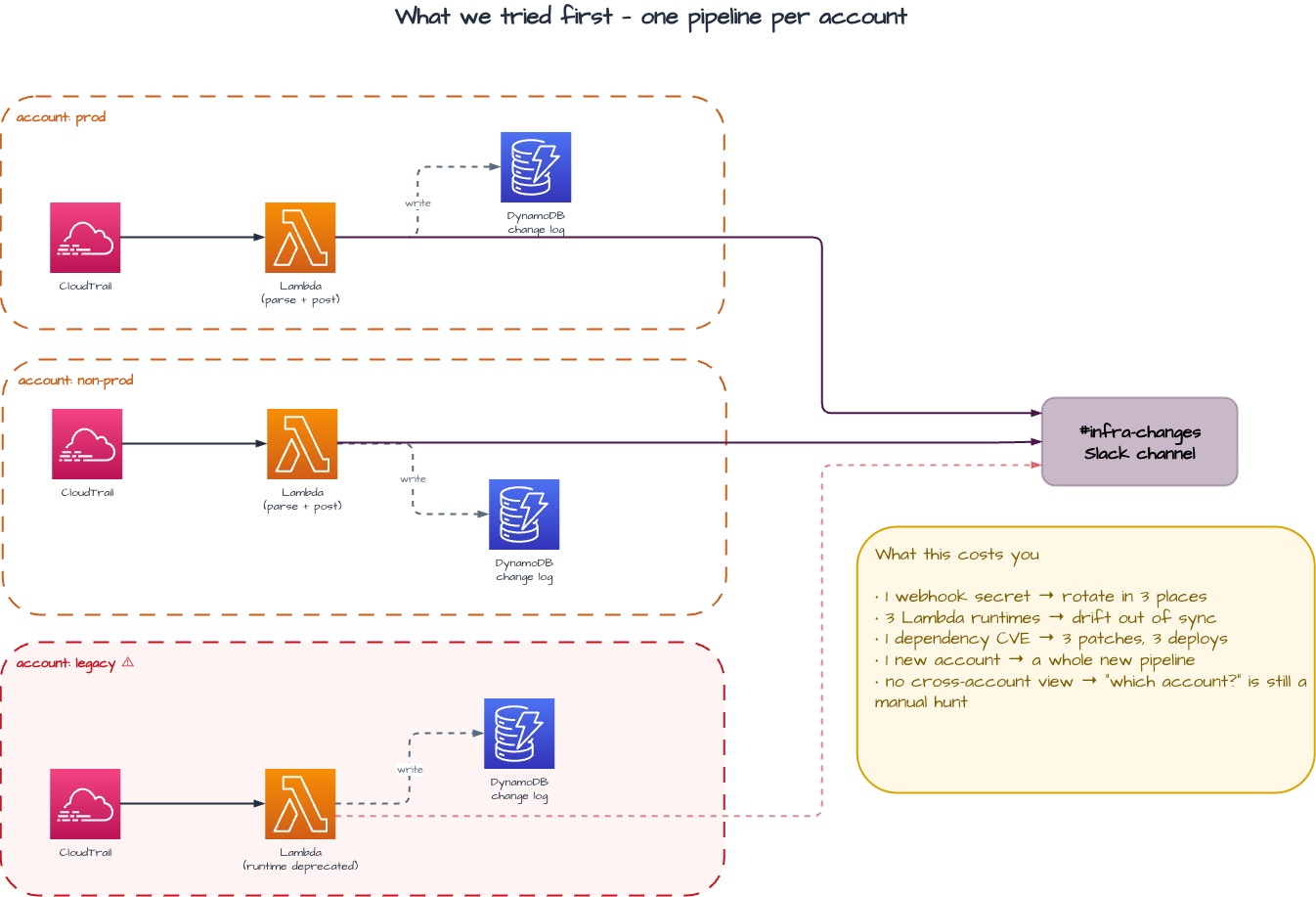
Each account had its own trail, an EventBridge rule matching ChangeResourceRecordSets and the other mutating calls, its own Lambda parsing those events into Slack, and a DynamoDB table of changes. We started with the accounts involved in the incident and it worked. As we extended the pattern to other teams the account count climbed past ten, and the shape stopped scaling.
The failure wasn’t any one of those pieces. It was the shape: a stateful pipeline replicated into every account, with another copy due for every account we would ever add. Each carried its own code, secrets and runtime, and aged on its own. Past ten accounts that meant one Slack webhook to rotate in ten places, ten Lambda runtimes drifting apart, the same CVE patched and redeployed ten times, and a fresh pipeline stood up for every new account — some of which, where ownership was weakest, quietly stopped reporting.
Ten per-account feeds tell you what changed inside each account, but to use them you already need to know which account to look in — and that is exactly what the incident didn’t tell us.
The lesson wasn’t that notifications were a bad idea. It was that audit is a read-side concern, and read-side concerns belong in one place instead of being copied into every account that emits events.
The shape of the fix
If answers live in N accounts and you can only ask one at a time, the fix is a single place that holds all of them. How each account’s events reach that one place is a delivery question, covered in Part 4 — not a candidate itself. Four storage and query candidates were on the table, and why three lost is almost entirely about what each one bills for rather than what each can do.
Price them against one scenario: ten accounts, roughly 5 GB a month of CloudTrail management events between them, about 10,000 configuration items per account per month, twelve months retention, and forensic use — ten queries a month, each pruned to a couple of partitions.
| Option | Billed on | Illustrative monthly cost at this scenario | Why it lost |
|---|---|---|---|
| CloudTrail → S3 + Athena | retention, plus bytes scanned per query | ≈ $1.40/mo. First copy of management events is free. 60 GB accumulated × $0.023/GB = $1.38. Ten queries scanning ~100 MB each = 1 GB × $5/TB ≈ $0.005 | Won. Cost tracks how long you keep data and how carefully you query, not how busy the estate is |
| AWS Config | per configuration item recorded | ≈ $300/mo. 10 accounts × 10,000 items × $0.003 = $300, recording alone, before any rule evaluations | Bills on how much the estate changes, whether or not anyone ever asks. A resource stuck in a create/delete loop bills for every cycle. Route 53 record-level coverage is also thinner than CloudTrail’s plain API capture |
| Self-managed Elasticsearch / OpenSearch Service | cluster hours, 24/7 | ≈ $280+/mo, illustrative — three small nodes for a minimal HA cluster, before EBS and snapshots. Runs whether or not you query | Earns its floor only when a cluster is busy, and ours would idle between incidents. Hands back the shard, ILM, upgrade and CVE maintenance we were trying to delete |
| CloudTrail Lake | per GB ingested, plus retention | Moot. AWS closed it to new customers on 31 May 2026 | Off the menu for anything you build now. We would have passed anyway: a standing charge on all ingested volume, queried or not |
Pricing changes, and those figures are illustrative: the useful comparison here is billing shape, not the exact dollar amount. Substitute your own numbers before trusting the ratio, since the gap moves with how much your estate changes versus how much you query. But the shape is the point. Three of the four charge continuously for data arriving. The fourth charges for keeping it and for the questions you actually ask, which in forensic use is a handful a month.
That leaves the boring one. The build itself is in Part 4 — The Fix.